
Space XY presents a space-themed casino game built around quick rounds, visual effects, and the possibility of bonus features. Its central appeal is easy to understand: players enter a cosmic setting, place wagers, and watch for outcomes that may trigger a more elaborate bonus round. Yet performance matters as much as presentation. When a game pauses, stutters, or takes too long to load precisely when a bonus begins, the experience can shift from exciting to frustrating.
This review focuses on performance issues during Space XY bonus rounds, what players may notice, and practical ways to reduce avoidable interruptions. The game’s availability, rules, and presentation can vary by casino and device, so the points below should be treated as a general guide rather than a guarantee about every version. Players from around the world should check their casino’s terms, supported devices, and local rules before playing.
First Impressions and Core Experience
Space XY uses a familiar structure: a player chooses a stake, starts a round, and waits for the result. The space setting gives the interface a distinct identity, while animations and sound effects help frame each spin or game event. The base game is generally straightforward to follow, which makes it accessible to newcomers who prefer a clear layout over a complicated collection of features.
The bonus round is where the game can feel more demanding. It may involve additional animations, changing scenes, extra symbols, or a sequence of interactive steps. These elements can make a feature feel more substantial, but they also require the device and connection to handle more activity at once. A smooth transition supports the sense of momentum; a delay can make the player wonder whether the round has registered correctly.
Why Bonus Rounds Can Feel Less Stable
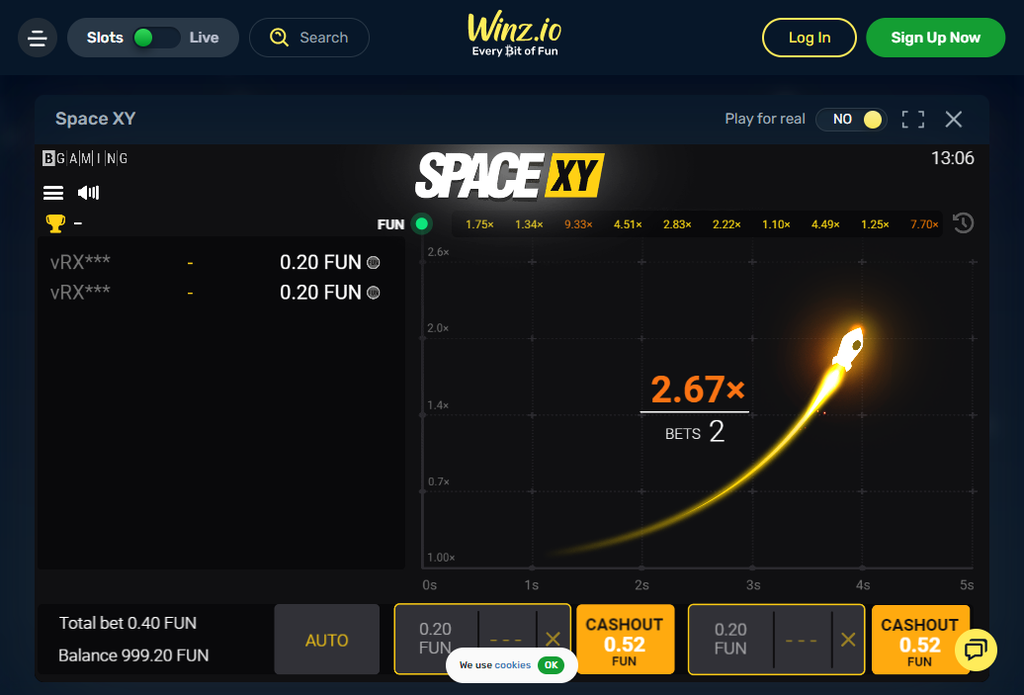
A bonus feature can put more pressure on a device than an ordinary game round. More visual effects may need to load, and the game may request additional data from the casino platform. On a strong connection and a recent device, this may happen without noticeable trouble. On an older phone, a crowded browser, or an unstable network, the same sequence can take longer or appear to freeze.
It is not always possible to identify the cause from the screen alone. A short pause could be normal processing, a temporary network delay, a browser issue, or a problem on the casino’s side. In some cases, animations may appear stuck even though the result has already been recorded by the game server. Players should avoid rapidly tapping buttons or refreshing the page while a round is unresolved, since repeated actions can create confusion about the game state.
Common Symptoms Players May Notice
- A long loading screen when a bonus feature starts.
- Animation that stutters, skips, or stops temporarily.
- Controls that respond slowly during a feature.
- A brief disconnection followed by a return to the game.
- A balance display that updates later than expected.
These symptoms do not automatically mean that a wager or result has been lost. The safest approach is to let the game finish processing, note the approximate time and round details, and contact the casino’s support team if the balance or history does not update as expected.
Playing Space XY on Different Devices
Device choice can make a noticeable difference. Desktop browsers often have more processing capacity and a larger display, while mobile play offers convenience but may be affected by battery-saving settings, background apps, limited memory, or a variable mobile connection. Tablets sit somewhere between the two, although their performance depends heavily on the model and browser.
Before playing, close unnecessary tabs and apps, update the browser, and check that the device has a stable internet connection. If the casino provides a dedicated app or recommends a particular browser, follow its guidance. Turning off aggressive battery optimization for the session may help some phones maintain consistent performance, but players should not change security settings or install unofficial software to improve gameplay.
Practical Steps Before Starting a Bonus Session
- Use a reliable Wi-Fi or mobile data connection and avoid switching networks mid-round.
- Close downloads, streaming services, and other high-bandwidth activity.
- Make sure the browser and operating system are up to date.
- Keep the device plugged in if low battery mode limits performance.
- Start with a modest wager while checking how the game runs on the device.
These measures cannot eliminate platform-side problems, but they reduce common sources of lag. If the game repeatedly stalls only during bonus rounds, test it later on a different supported device or connection. This can help determine whether the issue is local or more widespread.
Bonus Rounds, Expectations, and Responsible Play
Bonus features can make a game more engaging, but they should not be treated as a reliable route to a payout. Their frequency and outcome are governed by the game’s design and the applicable rules, not by a player’s device or by how long the game has been running. A technical delay does not improve the odds, and continuing to wager in an attempt to “make up” for a frustrating session can lead to poor decisions.
Set a spending limit before playing and decide how long the session will last. If a technical issue creates uncertainty, pause rather than placing more wagers. Review the game history and transaction record when available, and keep screenshots or notes if you need to report a disputed round. Use only casinos that are legally available to you and provide clear terms, responsible-gambling tools, and accessible support.
Questions and Answers
What should I do if a Space XY bonus round appears frozen?
Wait briefly without pressing several controls or refreshing the page. Check whether the balance or round history updates. If the game remains unresponsive, follow the casino’s instructions for reconnecting, then contact support with the time, device, and any round reference shown in the account.
Does a slow animation mean the bonus result has changed?
Not necessarily. A slow or incomplete animation may be a display or connection problem, while the server may have already recorded the outcome. Confirm the result through the casino’s game history or support channel instead of relying only on the animation.
Can I prevent every performance issue?
No. A stable device and connection can reduce local problems, but they cannot prevent outages or delays on the casino platform. If the issue happens repeatedly, stop playing until the operator clarifies what is happening.
Overall Assessment
Space XY’s space-themed presentation and clear basic structure can make it easy to approach, while its bonus rounds provide a more elaborate change of pace. Those features are most enjoyable when transitions are responsive. Performance interruptions during a bonus can undermine that experience, particularly when players are unsure whether the round has completed or the balance has updated.
The best way to approach the game is to keep expectations measured, use a supported device, and treat technical troubleshooting as separate from the game’s chances of paying out. A brief pause may be temporary, but repeated stalls deserve attention from the casino’s support team. Players should also read the rules and bonus terms before wagering, since features and conditions may differ across platforms and jurisdictions.
For a more dependable session, prioritize a reputable operator, a stable connection, and clear personal limits. If Space XY continues to perform poorly after basic checks, taking a break or choosing another game is more sensible than increasing the stake. The game’s appeal depends not only on its theme and bonus design, but also on a smooth, transparent experience from start to finish.